Eureka DevSecOps
PRODUCT · PRIORITIZATION

See what needs attention first.

A scanner can hand your team 1,000 findings. It can't tell you which ten to fix first, which are duplicates, which can wait, or which are steps in a real attack.

Eureka turns scanner output into prioritized work, so your team moves from finding issues to fixing the ones that matter.

30-day free trial. No credit card required.

Prioritization1,000 findings 10 to fix first
Scanner outputunranked
Eureka signalsapplied
  • Exploitability score
  • Reachability
  • Attack scenario link
  • ASVS context
Fix firstranked · exploitability1 attention
  1. #01
    SQL injection!
    web-api / users/query.tsASVS V5.3.4
    Exploit94
  2. #02
    Auth bypass
    checkout-svc / auth.tsASVS V2.1.1
    Exploit87
  3. #03
    SSRF
    web-api / webhook.tsASVS V12.6.1
    Exploit71
  4. #04
    Hardcoded secret
    billing-svc / config.tsASVS V6.4.1
    Exploit58
THE REDUCTION

From 1,000 findings to the 10 that matter.

Prioritization isn't a single filter. It's a sequence: strip the noise, add the context, surface the short list.

  1. 01
    SCANNER OUTPUT · UNRANKED

    1,000 findings

    Every finding from every scanner arrives in one flat list. Severity is the only sort, and severity looks at each issue in isolation.

  2. 02
    DEDUPED · SNOOZED · IGNORED

    Noise reduced

    Duplicates drop out automatically. Accepted risks and false positives are marked once with a reason and step aside, without disappearing from the record.

  3. 03
    EXPLOITABILITY · REACHABILITY · ASVS

    Context applied

    Eureka layers exploitability, reachability, ASVS mapping and attack-scenario relevance onto every remaining finding, so the ranking reflects real risk.

  4. 04
    FIX FIRST · RANKED QUEUE

    10 priorities

    What's left is a short, defensible list: the findings your team should work on first, with the reasoning attached to each one.

Step 1 of 8, The list a scanner hands you
THE JOURNEY · EIGHT MOMENTS

From scanner wall to a decision.

MOMENT 01

The list a scanner hands you

QUESTION TO ANSWER

What am I looking at?

HOW EUREKA ANSWERS
WITHOUT EUREKA

This is what a scan gives you: every finding, flat, in one list. Severity is the only sort, and severity looks at each issue in isolation. Nothing tells you what's a duplicate, what's handled, or what chains into a breach. Someone has to read all of it, usually a developer who'd rather be shipping.

WITH EUREKA

The same scan, opened in Eureka, looks different. Findings carry status, duplicates drop out, and the work sorts by what actually matters. The rest of this page is how.

MOMENT 02

Only what's actionable

QUESTION TO ANSWER

What changed?

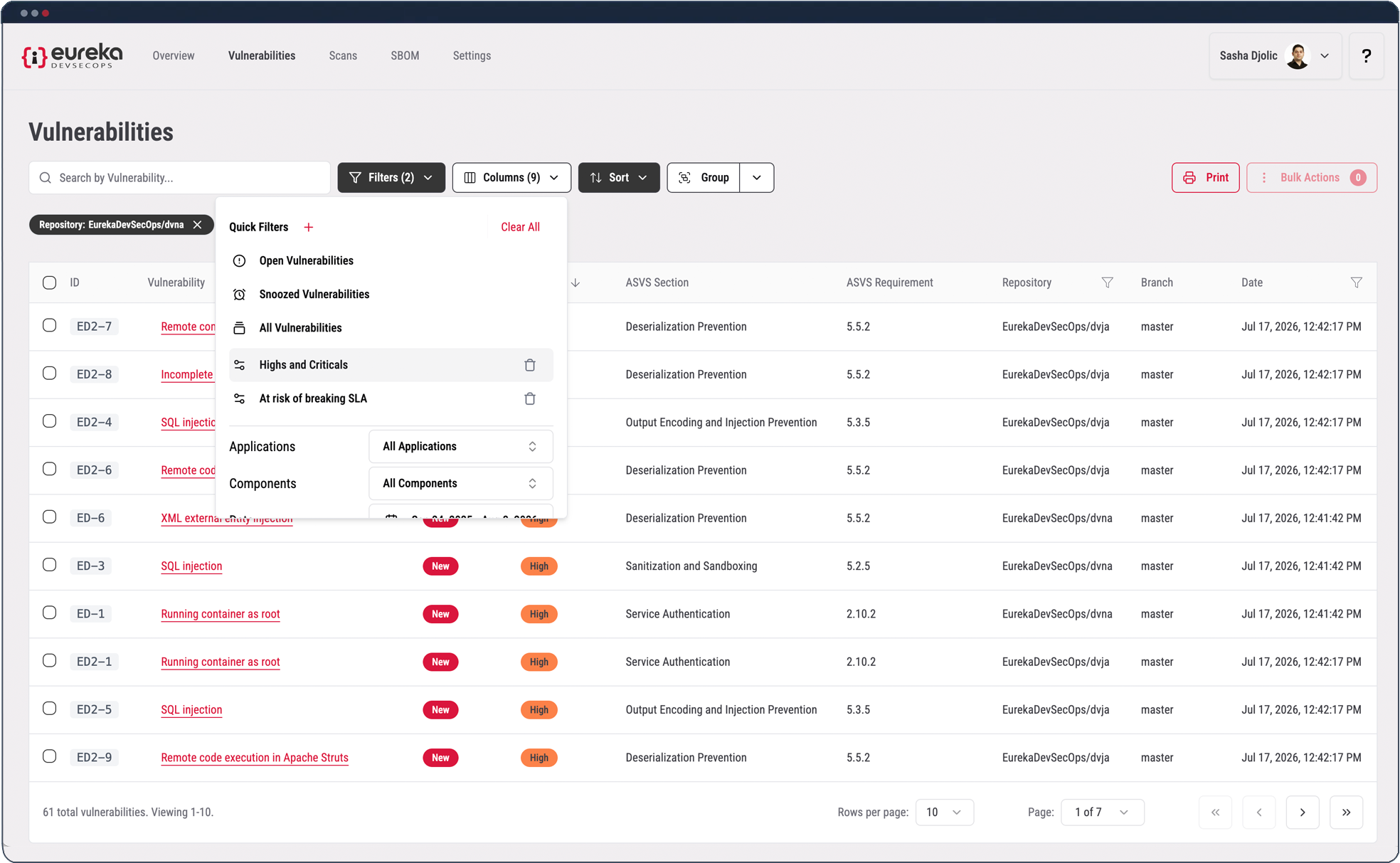
Quick Filters, Open, Snoozed, All
HOW EUREKA ANSWERS

Every finding has a status, new, snoozed, or ignored, and the default view shows only what's new and actionable. Duplicates are gone. Accepted risks are gone. Snoozed items are out of the way until they're due. You're looking at the work in front of you, not the scanner's raw total.

What changes: The list you triage is the short one, not the whole export.

MOMENT 03

Noise handled, not ignored

QUESTION TO ANSWER

What happened to the noise?

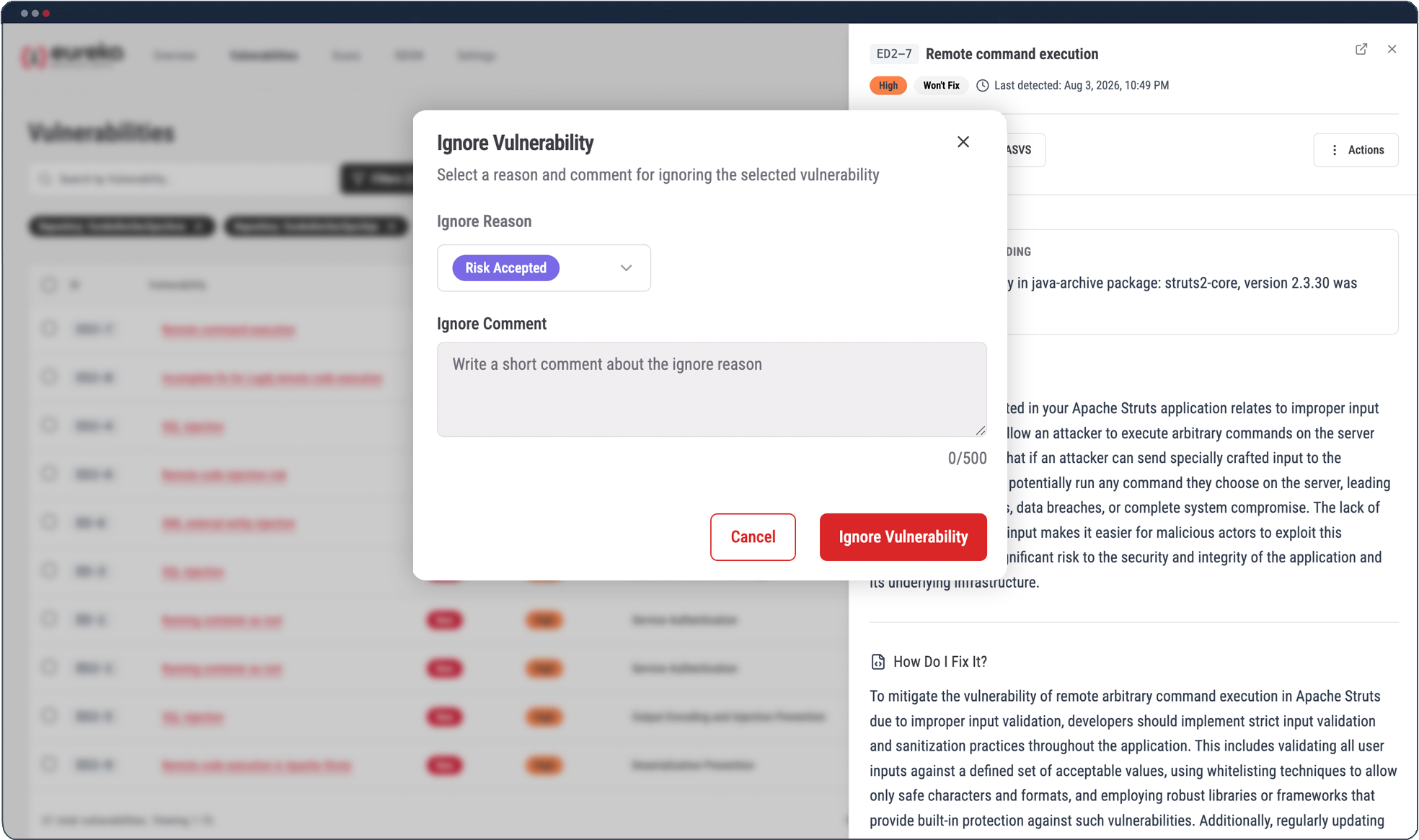
Triage decision modal, accept, ignore, snooze
HOW EUREKA ANSWERS

Eureka ignores duplicate findings automatically. When something is a false positive, you mark it ignored once and pick the reason, accept the risk, false positive, duplicate, or fixing it another way, with a note if you want. It leaves your actionable view but stays in the record. Nothing is deleted; it's just out of your way.

MOMENT 04

A runway, then a hard stop

QUESTION TO ANSWER

What about findings I can't fix today?

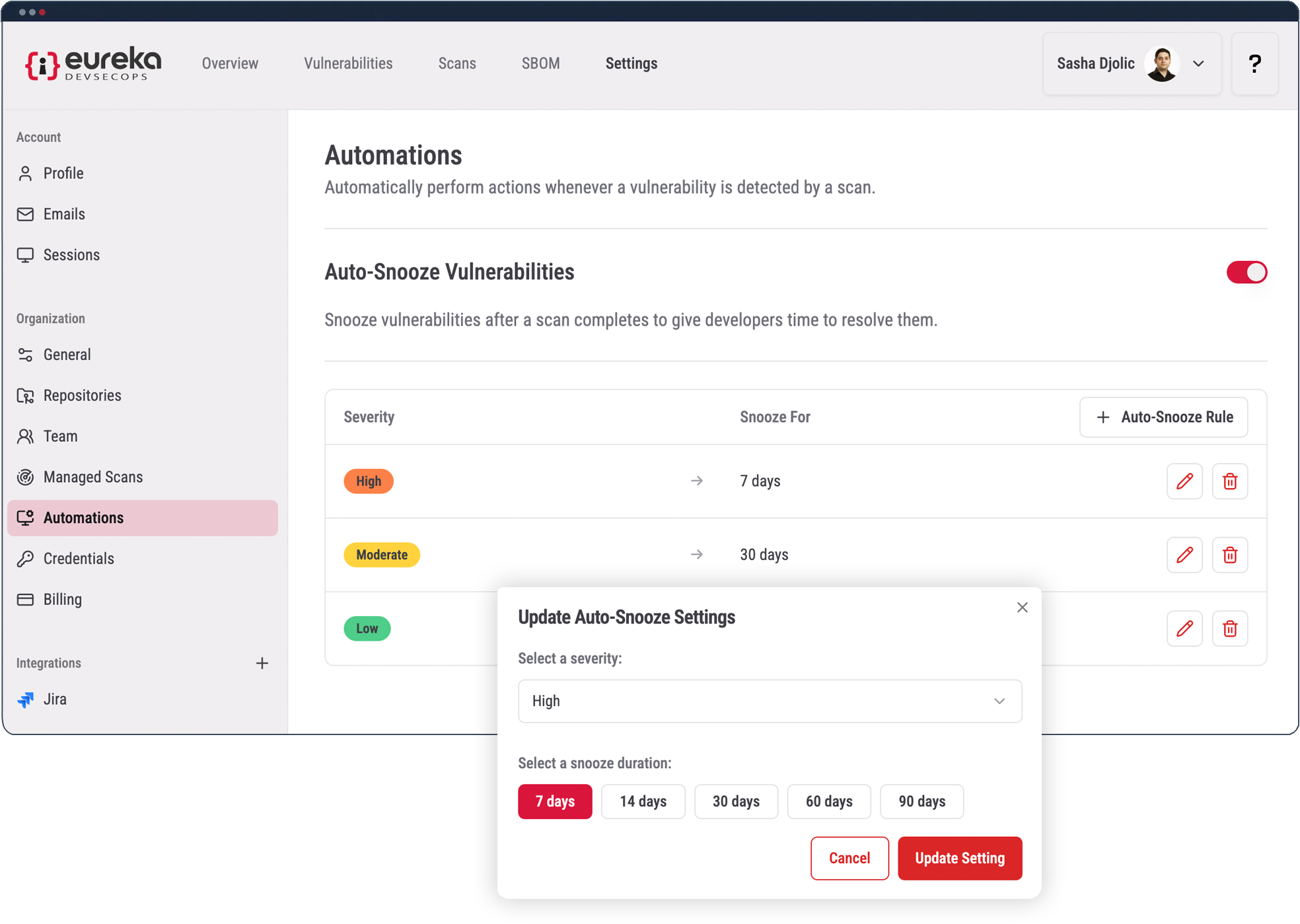
Automations, auto-snooze by severity
HOW EUREKA ANSWERS
WITHOUT EUREKA

Block every PR on every new finding and developers route around security. Leave findings open and they quietly pile up. Neither is a plan.

WITH EUREKA

Set an SLA once, say, anything moderate or above gets 30 days. New findings above that threshold snooze automatically for the window, so GitHub PR checks still pass and work keeps moving. If a finding isn't fixed when the window closes, it goes active again and the GitHub PR check starts failing. PR-check enforcement on GitLab, Bitbucket, and Azure DevOps is in progress.

Setup: Settings → Automations. Pick a severity, pick a duration, save. Under a minute.

MOMENT 05

Your own triage views

QUESTION TO ANSWER

Can I focus on my slice?

Finding drawer, ASVS mapping and detail
HOW EUREKA ANSWERS

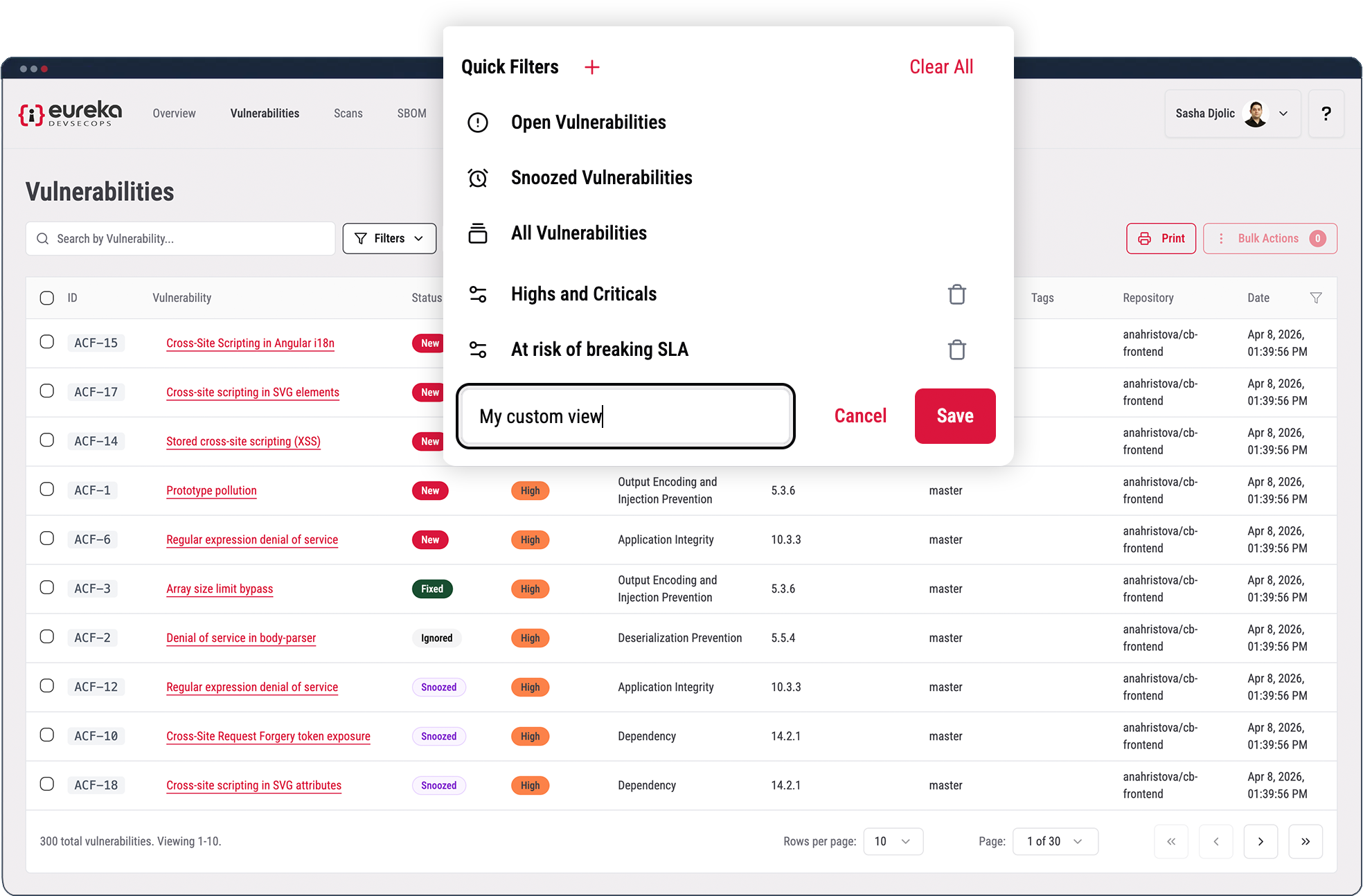
Filter by branch, version, tag, source, status, or ASVS section, then save the view. Call it what you want: "V1 product," "this release," a reviewer's name. Saved views are shared across the team, so everyone sees the same slice. Teams shipping several versions at once switch between them in a click.

What changes: Triage stops being one giant list and becomes the view that matters to you.

MOMENT 06

Findings you can actually read

QUESTION TO ANSWER

Why can I read this one?

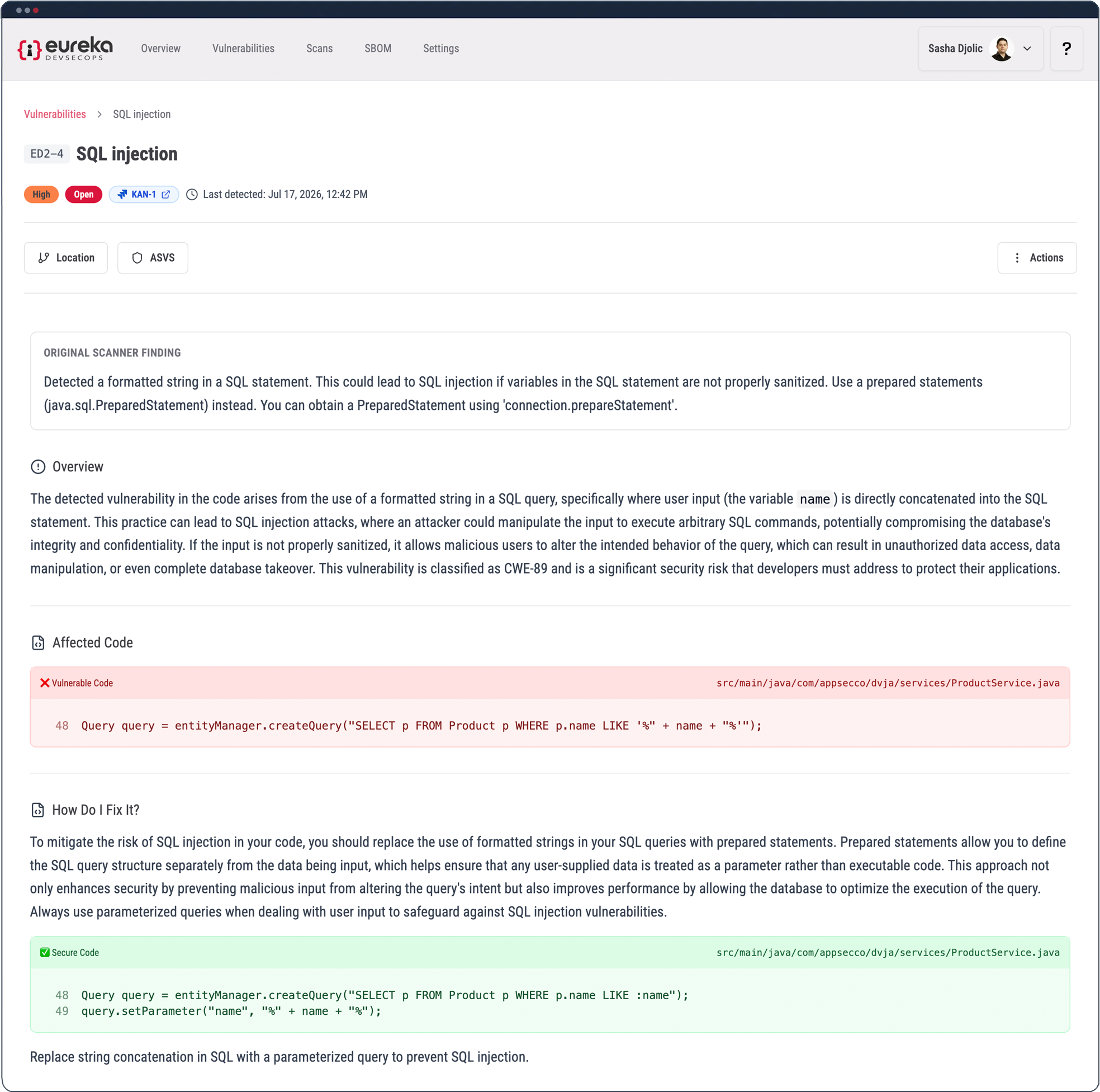
How Do I Fix It, remediation guidance in the finding drawer
HOW EUREKA ANSWERS

Click any finding and the detail drawer opens. Eureka rewrites the title and description in plain language, what the problem is, without the scanner's raw jargon. This happens on top of whatever scanner found it, so every finding reads the same way no matter where it came from. The context that usually lives in a senior AppSec engineer's head is written right into the finding.

MOMENT 07

Attack scenarios, the real story

QUESTION TO ANSWER

Which findings are actually dangerous?

HOW EUREKA ANSWERS
WITHOUT EUREKA

Severity treats every finding on its own. A medium here and a medium there look unrelated, until an attacker chains them into a way in.

WITH EUREKA

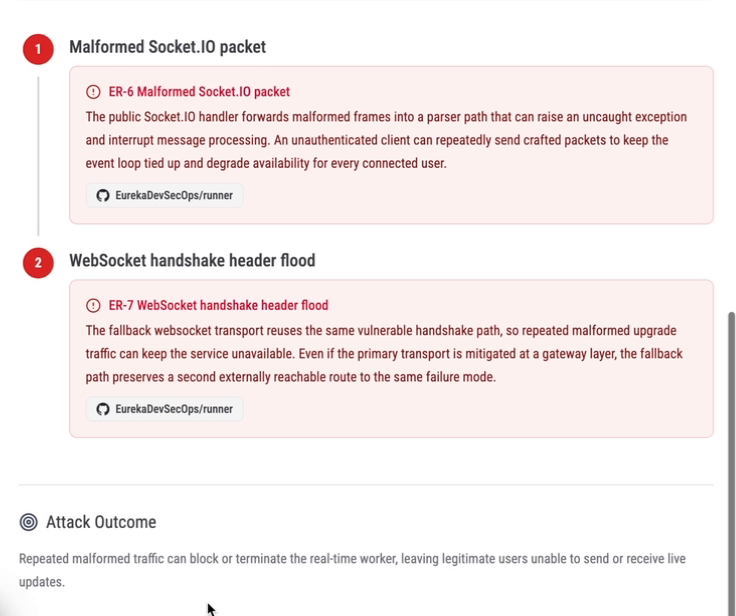
Attack Scenarios models how findings connect. Each scenario has a description, a precondition, and an attack path, a sequence of steps where every step links to a real vulnerability in your code. It tells you whether the attacker needs an account, what they end up with, and scores the whole chain 0–100. Scenarios rank by score, so the dangerous ones sit at the top.

We ran Eureka against a deliberately vulnerable open-source test app, the kind built to benchmark scanners. The scan returned about 230 vulnerabilities. Threat modeling returned 7 attack scenarios, and 3 of them were the dangerous ones. That's the difference between a list of 230 and a list of 3. Same findings. A decision instead of a backlog.

MOMENT 08

The score comes back to your list

QUESTION TO ANSWER

How does this show up in my daily work?

HOW EUREKA ANSWERS

The scenario score returns to the vulnerability table as an exploitability score. Sort by it and the findings that belong to a real attack path rise above the ones that only look scary in isolation. Add the quick filter and 230 open findings become the handful that are actually on a path to your data. You can finally see the forest, not the trees.

WHERE EUREKA SITS

Scanners find issues. Eureka turns output into prioritized action.

All-in-one platforms find more issues. Eureka gives you a decision instead of a backlog.

Traditional scanners

Surface findings. Every issue, flat, sorted by severity.

You get the list. Triage is your problem.

All-in-one platforms

Aggregate more scanners into one dashboard.

More to read; the same question is still unanswered.

Eureka

Turn output into ranked work, duplicates gone, attack paths modeled, next step attached.

You get a decision, not a backlog.

FAQ

Frequently asked questions.

Know what matters.
Then fix it

Start with a scan. Eureka ranks the work, keeps every decision attached to the record, and hands the next step to remediation.

30-day free trial. No credit card required.